
Beyond disk space
CPU and memory
Click the memory reading and you get the applications actually holding it, and a way to close one. That is the only thing that returns memory — which is why there is no purge button.
See what is actually using your memory
Biggest first, with each app's helper processes counted together — a browser is forty-odd processes and reads as nothing in a per-process list.
Quitting an app returns its memory at once. For a browser, whose processes are mostly tabs, Show brings it to the front so you can close a few instead, which is usually the better trade — and only you know which few. Quit asks rather than kills: an app with unsaved work puts up its own dialog and may refuse.
Anything macOS owns, or that has no Quit to ask for, is listed without a button. A list that let you kill WindowServer would eventually be used to.
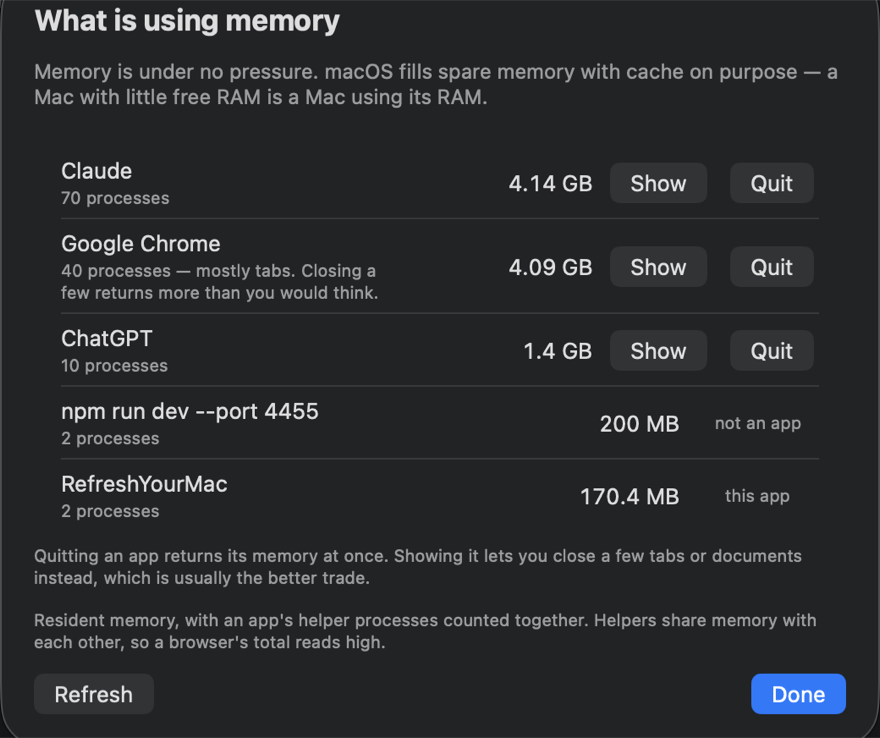
Resident memory double-counts what an app's helpers share, so a browser's total reads high. Activity Monitor has the same problem and solves it no better, so the sheet says so rather than quietly correcting a number it cannot correct honestly.
What it reads
- Processor load over the last minute, with the busiest process named.
- Memory pressure, which is macOS's own verdict rather than a free-megabytes figure.
- How much the compressor holds, and how much app memory is inside it. That ratio is the honest answer to "where did my memory go".
- The rate at which pages are moving to and from swap. The rate is the signal, not the total — one Mac had written 60 GB to swap since booting while sitting completely idle. A lifetime figure says where memory has been, not whether it hurts now.
And why there is no purge button
Other cleaners offer one that empties the disk cache so the free-memory figure jumps. The cache was never taking memory away from anything: macOS drops it by itself the moment an app needs the space, and reads it straight back afterwards. The number moves; the Mac does not get faster, and for a few seconds it gets slower.
So the row states what the button would actually do. On one Mac on 21 September 2026 it would have freed 40.6 MB that was genuinely spare, dropped 3.12 GB macOS would re-read, and been unable to touch the 4.83 GB the compressor was holding.